Open the CRUX Granular user manual 
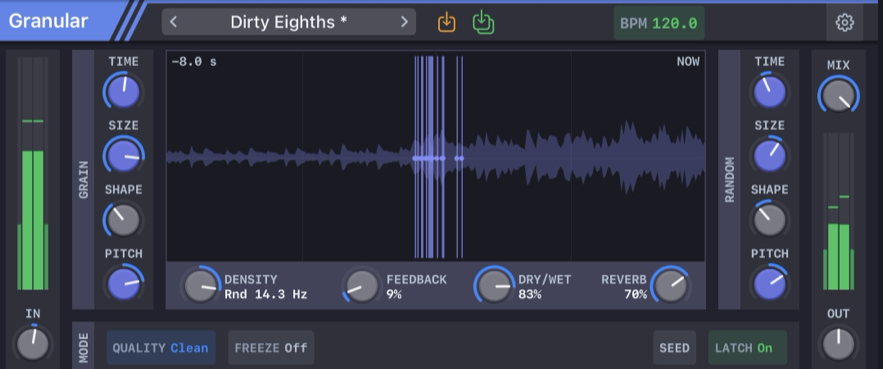
CRUX Granular is a live granular processor that records its input into a rolling buffer and plays it back as up to 32 overlapping grains, with feedback, a built-in plate reverb and a tempo-synced delay mode. It runs on iPhone and iPad, as a standalone app and as an AUv3 effect plugin.
What it does
- Up to 32 grains read from a rolling buffer of the incoming audio.
- TIME picks where in the buffer the grains read from, and the scope shows the buffer history with each grain's position on it.
- SIZE sets grain length from about 8 ms to 4 seconds. The left third of the knob plays the grains in reverse.
- SHAPE morphs the grain envelope from square through a smooth bell to a reversed swell.
- PITCH transposes the grains from -24 to +24 semitones, snapping to unison, octaves and musical intervals.
- A random amount for each of TIME, SIZE, SHAPE and PITCH. Positive values move every grain together, negative values give each grain its own random offset.
- DENSITY fires grains at a regular rate on one side of the knob and at random times on the other. At the centre, each SEED press fires a single grain.
- FREEZE stops writing new input, so the grains keep playing what is already in the buffer.
- FEEDBACK writes the output back into the buffer, for textures that build on themselves.
- A plate reverb after the grains, with its own amount.
- Four QUALITY modes, each with its own sound and buffer length: Hi-Fi (16-bit at 48 kHz, 4 second buffer), Clean (12-bit at 32 kHz, 8 second buffer), Tape (12-bit at 24 kHz with tape saturation, 10.7 second buffer) and Dirty (8-bit at 24 kHz with saturation, wow and flutter, 16 second buffer).
- SIZE fully clockwise turns the processor into a multi-tap tape style delay, locked to the app or host tempo, with tap tempo on SEED.
- LATCH runs the grains on their own, or only while SEED is held.
- 13 factory presets, a user preset library with folders and tags, and
.crxbbank export and import.
App and plugin
The standalone app processes live input from the microphone or an audio interface, or plays an audio file in a loop, and has a MIDI input that answers Program Change (for switching presets). The AUv3 plugin runs the same effect inside any AUv3 host and saves with the host project.